Acer Swift 16 AI Review: Big-Screen Brilliance Meets All-Day Endurance
On paper, the Swift 16 AI looks like a spec-sheet dream: a 16-inch 2880×1800 OLED panel with a 120Hz refresh rate, Intel Core Ultra Series 3 CPUs, Intel Arc integrated graphics, Wi-Fi 7, Thunderbolt 4, a massive haptic touchpad that supports MPP 2.5 styluses, and a chassis that weighs under 1.55 kg (around 3.4–3.5 lbs). Acer Swift 16 AI Review
LAPTOPS
10 min read
If you’ve ever wished your thin-and-light laptop came with a truly immersive display without turning into a back-breaking slab, Acer’s Swift 16 AI might be the closest thing yet to that ideal.
The 2026 Acer Swift 16 AI arrives as a surprisingly polished ultraportable: a slim, lightweight 16-inch laptop that pairs a vivid 3K OLED touchscreen with Intel’s latest Core Ultra “Panther Lake” processors, long battery life, and a price that undercuts many premium rivals. It positions itself as a Copilot+-era Windows laptop for creators, professionals, and power users who want more screen real estate without sacrificing portability.
On paper, the Swift 16 AI looks like a spec-sheet dream: a 16-inch 2880×1800 OLED panel with a 120Hz refresh rate, Intel Core Ultra Series 3 CPUs, Intel Arc integrated graphics, Wi-Fi 7, Thunderbolt 4, a massive haptic touchpad that supports MPP 2.5 styluses, and a chassis that weighs under 1.55 kg (around 3.4–3.5 lbs). Acer also claims up to 24 hours of battery life and markets the machine as an “AI PC,” promising smarter performance and next-gen features.
The reality, as always, is more nuanced. The Swift 16 AI gets a lot right—especially its display, battery efficiency, and overall value—but it also makes some compromises, particularly around audio quality, RAM limits, and the practical impact of its so-called “AI” features.
What follows is a deep, balanced look at what the Acer Swift 16 AI does well, where it falls short, and who it’s actually for.
Overview: A Big-Screen Ultraportable with Creative Ambitions
Acer positions the Swift 16 AI as a large-screen alternative to 13- and 14-inch ultrabooks, aimed at users who want a more spacious workspace for multitasking, spreadsheets, content creation, and creative work. Unlike bulky 16-inch gaming laptops or mobile workstations, this model is squarely in the “ultraportable” category.
Most reviewed configurations feature:
CPU: Intel Core Ultra Series 3 (Panther Lake), commonly the Core Ultra 7 256V
Graphics: Intel Arc integrated GPU (130V or 140V depending on SKU)
Display: 16-inch OLED, 2880×1800 (3K), 16:10 aspect ratio, up to 120Hz
Memory: 16GB LPDDR5X (soldered)
Storage: 1TB PCIe SSD
Battery: ~69–70 Wh
Weight: ~3.3–3.5 lbs (1.5–1.6 kg)
This isn’t meant to be a gaming powerhouse or a hardcore mobile workstation. Instead, Acer is chasing a more balanced formula: premium visuals, strong everyday performance, excellent battery life, and a price that makes OLED-equipped 16-inch laptops feel accessible.
In many ways, that strategy works.
Design and Build: Thin, Light, and Tastefully Minimal
The Swift 16 AI adopts a clean, understated aesthetic. The aluminum chassis has a matte finish that resists fingerprints reasonably well, and Acer’s branding is subtle—no flashy logos or aggressive accents. It looks at home in a conference room just as much as in a café.
Despite its 16-inch screen, the laptop feels surprisingly compact. Slim bezels and a tapered profile make it easy to slip into a backpack or commuter bag, and at under 1.6 kg, it’s far lighter than most large-screen laptops. You don’t feel like you’re lugging around a desktop replacement.
Acer uses a hinge design that slightly lifts the rear of the laptop when opened, creating a gentle incline for the keyboard. This improves typing ergonomics and helps with airflow. The hinge also allows the screen to open flat to 180°, which is useful for collaborative work or presentations across a table.
Build quality is solid overall. There’s minimal flex in the lid, the keyboard deck feels sturdy, and the hinge has enough resistance to keep the display stable while still opening smoothly with one hand. It doesn’t quite have the tank-like feel of some ultra-premium models from Dell or Lenovo, but it feels well-made for its price tier.
The Swift 16 AI is available in new color options like Aurora Silver and Elemental Blue, adding a touch of personality without being loud or gimmicky.
Ports and Connectivity: Practical and Future-Proof
One of the Swift 16 AI’s understated strengths is its port selection. In an era when many thin laptops rely heavily on dongles, Acer includes a genuinely useful mix of connections.
You get:
2× USB-C with Thunderbolt 4 (40 Gbps)
Both ports support charging, data, and external displays.HDMI (reported as HDMI 2.1)
Handy for direct connections to monitors or projectors.USB-A ports
For legacy peripherals like mice, flash drives, and keyboards.3.5mm audio jack
Always appreciated.
On the wireless side, the laptop supports Wi-Fi 7, which future-proofs it for next-generation routers and high-speed networks.
The only ergonomic nitpick here is port placement: both USB-C ports are on the left side, which means your charging cable always enters from the same direction. It’s not a deal-breaker, but it’s a small design quirk worth noting.
Webcam and Biometrics: Surprisingly Good, with One Big Omission
Acer equips the Swift 16 AI with a 1080p to 1440p infrared webcam (depending on region and SKU). That’s a notable upgrade over the usual 720p cameras found on many laptops, and in real-world use it shows. Video calls look sharper, with better color and contrast than the average thin-and-light machine.
The IR camera also enables Windows Hello facial recognition, which works quickly and reliably for logging in.
However, there’s a puzzling omission: no physical privacy shutter. Given how many competitors include a simple sliding cover, this feels like a missed opportunity—especially on a laptop that otherwise emphasizes premium touches and security-minded features.
The microphones are solid for calls and voice commands, with Acer’s AI-assisted noise reduction doing a decent job of filtering background noise, though it’s not dramatically better than what other modern laptops offer.
Display: The Swift 16 AI’s Show-Stopping Feature
If there’s one reason to buy this laptop, it’s the display.
The Swift 16 AI’s 16-inch OLED panel is simply gorgeous. Key specs:
Resolution: 2880 × 1800 (3K)
Aspect ratio: 16:10
Refresh rate: Up to 120Hz (variable)
Color: Near-100% DCI-P3 coverage
Touch: Yes
In daily use, the screen delivers exactly what you’d expect from a modern OLED: deep blacks, vibrant colors, and excellent contrast. Photos and videos pop, UI animations feel fluid at 120Hz, and text looks crisp thanks to the high resolution and taller 16:10 aspect ratio.
For creative professionals, the color reproduction is a major selling point. The panel is well-suited for photo editing, video grading, and design work, especially given its wide color gamut and strong calibration potential. It’s easily one of the best displays you’ll find on a laptop in this price range.
There are tradeoffs, though.
First, the finish is very glossy. In controlled lighting, it looks stunning. In bright offices, cafés, or near windows, reflections can become distracting. If you frequently work outdoors or in brightly lit environments, this could be a real downside.
Second, while brightness is solid for indoor use, it’s not class-leading. In direct sunlight, the OLED can struggle to maintain visibility, especially with darker content.
Still, for most users, the Swift 16 AI’s display is a standout feature that elevates the entire experience.
Touchpad and Input: A Creative Twist
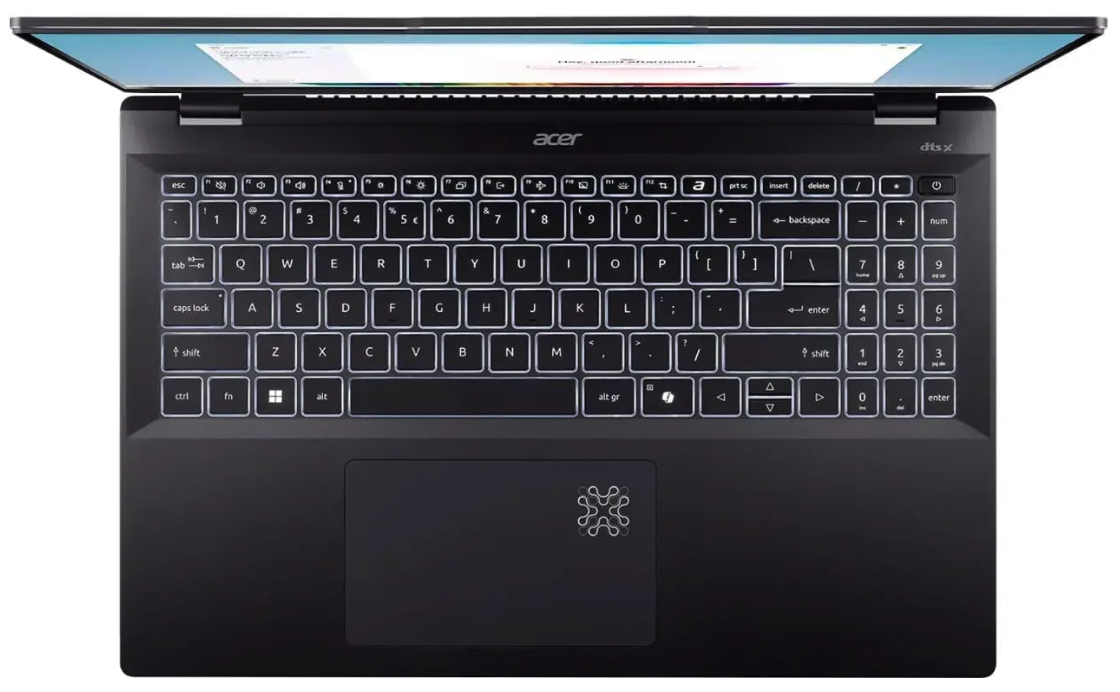
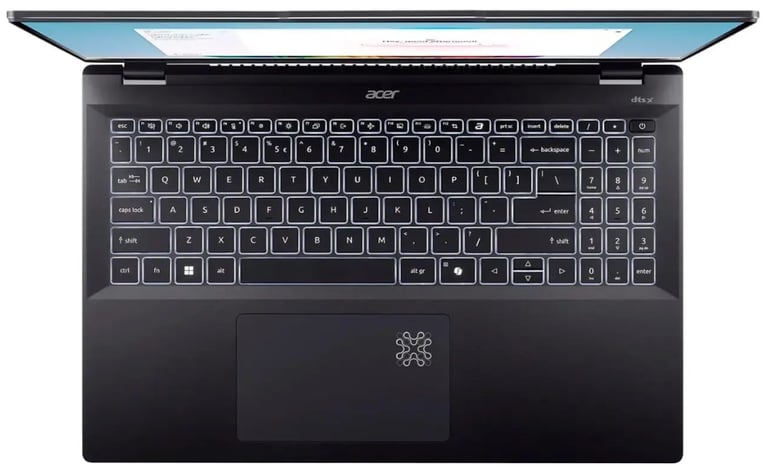
Another unique feature is the massive haptic touchpad. Acer bills it as the world’s largest haptic trackpad on a laptop, and it certainly feels enormous. It’s covered in Corning Gorilla Glass and supports MPP 2.5 styluses, effectively turning it into a small digital drawing pad.
For artists, designers, and note-takers, this is an intriguing idea. You can sketch, annotate, or navigate with a stylus directly on the touchpad, which adds a layer of versatility that most laptops simply don’t offer.
In practice, it works reasonably well, though it’s not a replacement for a dedicated drawing tablet. The haptic feedback is crisp and customizable, and palm rejection is decent, but serious digital artists will still prefer a larger, more specialized input device.
The keyboard is comfortable for long typing sessions, with good key travel and spacing. However, Acer’s decision to include a numpad comes with a compromise: it displaced the upward-firing speakers found on some previous models, contributing to the laptop’s underwhelming audio (more on that later).
Performance: Efficient, Responsive, but Not a Powerhouse
Under the hood, the Swift 16 AI uses Intel’s Core Ultra Series 3 (Panther Lake) processors, most commonly the Core Ultra 7 256V in reviewed configurations. These chips are designed for efficiency as much as raw speed, pairing respectable CPU performance with Intel Arc integrated graphics.
Everyday Performance
In real-world use, the Swift 16 AI feels fast and responsive. Office work, web browsing with dozens of tabs, coding, and light photo editing are all smooth. Single-thread performance is strong, and the system handles multitasking without noticeable slowdowns.
Creative Work and Light Gaming
The integrated Intel Arc GPU (often the Arc 140V) is surprisingly capable for its class. It handles GPU-accelerated tasks in Adobe Premiere Pro, Photoshop, and similar apps without issue, and it can even run mainstream games at 1080p with medium settings.
Don’t expect miracles, though. This isn’t a replacement for a discrete GPU. Heavy 3D rendering, advanced motion graphics, or sustained 4K video exports will push the system to its limits.
Benchmarks and Thermal Behavior
Independent benchmarks place the Swift 16 AI firmly in the upper midrange of modern ultrabooks. Geekbench, PCMark, and Cinebench scores are in line with other Lunar Lake and Panther Lake machines, confirming that Acer’s thermal tuning prioritizes efficiency and quiet operation over peak sustained performance.
Under light to moderate loads, the laptop stays cool and nearly silent. Fans ramp up under heavier workloads, but noise levels remain reasonable, and the chassis doesn’t become uncomfortably hot. For its size and weight, thermal management is well-handled.
Battery Life: A Genuine Strength
Battery life is one of the Swift 16 AI’s biggest wins.
Despite some confusing or incorrect online claims (including a widely circulated but wrong “20Wh battery” figure), the laptop actually packs a ~69–70 Wh battery, which is perfectly appropriate for a 16-inch machine.
In real-world tests and independent reviews:
Video playback: Often 15–18 hours
Mixed productivity: Easily a full workday, sometimes more
Light workloads at 60Hz: Potentially approaching Acer’s lofty “up to 24 hours” claim
The key here is efficiency. Intel’s new platform sips power during everyday tasks, and the OLED panel—especially when set to 60Hz—doesn’t drain the battery as aggressively as older OLED implementations.
Charging is handled via a 65W USB-C PD adapter, with fast top-ups possible. Many reviewers report reaching 50% in around 35–40 minutes and a full charge in under two hours.
There is one caveat: some users have reported inconsistent charging behavior with third-party USB-C chargers, though the included adapter works reliably.
Audio: The Weakest Link
If the Swift 16 AI has a glaring flaw, it’s the speakers.
They’re downward-firing, and it shows. Sound is thin, lacking in bass, and easily muffled by soft surfaces like a desk or bed. For casual YouTube videos or video calls, they’re passable. For music, movies, or immersive content, they’re disappointing—especially on a laptop with such a beautiful display.
This is a common theme across reviews: the speakers simply don’t match the rest of the hardware’s quality. If audio matters to you, plan on using headphones or external speakers.
Software and “AI” Features: More Marketing Than Magic
Acer markets the Swift 16 AI as an “AI PC,” and while it does include modern features like Copilot integration, AI-assisted webcam and microphone enhancements (PureView and PureVoice), and Intel’s latest NPU hardware, the real-world impact is modest.
These tools work, but they don’t fundamentally change how you use the laptop. Noise reduction is helpful, auto-framing is nice for calls, and Copilot can be convenient—but none of this feels transformative.
There’s also the usual dose of pre-installed bloatware: trial apps and OEM utilities that most users will want to remove during initial setup.
In short, the “AI” branding feels more like a forward-looking label than a must-have feature set today.
Price and Value: One of the Swift 16 AI’s Biggest Strengths
At an MSRP typically around $1,199–$1,250, and often discounted lower in retail sales, the Swift 16 AI offers strong value for what it includes.
You’re getting:
A premium 3K OLED 120Hz display
Intel Core Ultra performance
16GB LPDDR5X RAM
A 1TB SSD
Wi-Fi 7 and Thunderbolt 4
Excellent battery life
A lightweight 16-inch chassis
Many competing 16-inch ultrabooks either cost more for similar specs or cut corners on display quality or battery endurance. Compared to flagship models like the Dell XPS 16 or some Galaxy Book variants, the Swift 16 AI often undercuts them while still delivering a premium experience.
That makes it one of the more compelling value propositions in the large-screen Windows laptop market right now.
Where the Swift 16 AI Falls Short
No laptop is perfect, and the Swift 16 AI’s compromises are worth weighing carefully:
Cons:
Poor audio quality: Tinny, bass-light, downward-firing speakers.
RAM ceiling: Most SKUs max out at 16GB, limiting heavy creative and AI workloads.
Glossy OLED reflections: Beautiful, but not ideal in bright environments.
Inconsistent third-party charging: Some USB-C chargers don’t always work smoothly.
No physical webcam shutter: A surprising omission for privacy-minded users.
Bloatware: Requires some cleanup out of the box.
Port placement: All USB-C ports on one side.
These aren’t deal-breakers for most users, but they do define the Swift 16 AI’s practical limits.
Who Should Buy the Acer Swift 16 AI?
Ideal for:
Mobile creatives who want a top-tier OLED display for photo and video editing.
Professionals who need long battery life and a spacious screen for productivity.
Students or remote workers who value portability without sacrificing screen size.
Buyers seeking premium features at a more accessible price than flagship ultrabooks.
Not ideal for:
Users who need a discrete GPU for heavy 3D or long 4K rendering sessions.
Power users who require 32GB+ RAM for demanding workflows.
Anyone who works mostly outdoors or in very bright environments.
Audiophiles who expect strong built-in speakers.
Final Verdict: A Smart, Stylish, Big-Screen Ultrabook
The Acer Swift 16 AI isn’t trying to be everything to everyone—and that’s precisely why it works.
It delivers a rare combination of a gorgeous 3K OLED display, excellent battery life, respectable performance, and a lightweight 16-inch form factor at a price that feels genuinely competitive. For commuters, creatives, and professionals who want a large canvas without the bulk of a workstation or gaming laptop, it checks most of the right boxes.
It’s not perfect. The speakers are underwhelming, the glossy screen isn’t ideal for all lighting conditions, and the 16GB RAM limit will frustrate some power users. The “AI” branding also feels more aspirational than essential at this stage.
But taken as a whole, the Swift 16 AI represents one of the best value propositions in the current Windows ultrabook market. It’s a reminder that today’s best laptops aren’t just about chasing peak benchmark numbers—they’re about balancing display quality, battery endurance, connectivity, and price into a package that makes everyday computing genuinely enjoyable.
For anyone who wants a premium big-screen laptop that won’t weigh them down—or empty their wallet—the Acer Swift 16 AI deserves serious consideration.
Stay Updated, Latest News
This website contains affiliate links, and we may earn a commission at no extra cost to you.